Elastic Stretch: Why This Display Font Might Be the Missing Piece in Your Design Strategy
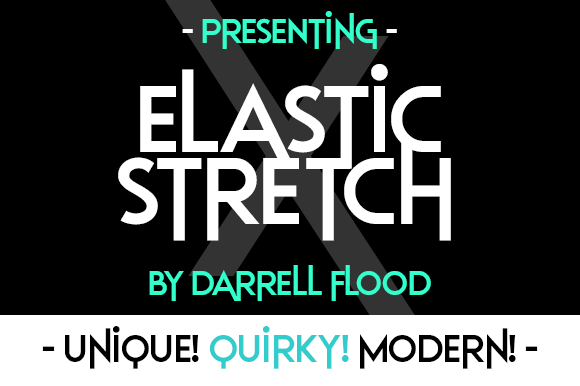
Choosing a typeface is rarely just about picking something that looks nice. It is a strategic decision that dictates how your audience perceives your message before they even read a single word. If you are looking for a display font that balances modern aesthetics with unexpected versatility, Elastic Stretch deserves a spot on your shortlist. It is clean, it is contemporary, and, contrary to what its name might suggest, it is not limited to just one niche.
Many designers and marketers overlook Elastic Stretch because they assume "stretch" implies a gimmicky or overly stylized effect suitable only for party flyers or retro posters. That is a common misconception. While it certainly has character, its underlying structure is sophisticated enough to anchor high-end branding, editorial layouts, and digital interfaces. The key lies in understanding how to deploy it correctly without falling into the traps that cause most fonts to fail under pressure.
The Versatility Misconception
The first mistake people make when evaluating Elastic Stretch is underestimating its range. Because it is a display font, there is a temptation to use it exclusively for headlines. While this is its primary strength, ignoring its potential in secondary contexts can limit your creative output. Conversely, overusing it in body text will destroy readability and user experience.
Elastic Stretch shines when it acts as the visual hook. Imagine a landing page for a tech startup where the hero headline uses Elastic Stretch to convey innovation and fluidity, while the supporting copy relies on a neutral sans-serif like Inter or Roboto. This contrast creates hierarchy. The eye is drawn to the stretch, then guided smoothly down to the information. If you try to force Elastic Stretch into long paragraphs, you risk fatigue. The unique proportions of the letters demand attention; they do not recede into the background like a standard typeface should.
Context Matters More Than Style
Another frequent error is pairing Elastic Stretch with incompatible typefaces. A natural instinct might be to pair it with another quirky or geometric font, but this often results in visual clutter. Instead, look for balance. Pairing a dynamic, stretched display font with a highly legible, minimalistic serif or sans-serif creates a professional tension. It says, "We are creative, but we are also grounded."
- Pairing Success: Use Elastic Stretch for large headings and pair it with a clean, neutral sans-serif for body text.
- Pairing Failure: Avoid combining it with other decorative fonts, script fonts, or heavily textured typefaces.
Technical Considerations and Licensing
Before downloading or purchasing Elastic Stretch, you must address the technical and legal realities. Many users rush into usage without checking the licensing terms, which can lead to costly fines later. Not all fonts labeled as "free" are free for commercial use. Some may require attribution, while others restrict usage to non-commercial projects only.
If you are a freelancer or a business owner, ensure you have the correct license. Using a premium font without a proper license is not just unethical; it is a liability. Check if the license covers web embedding, print materials, and merchandise. Elastic Stretch is designed to be robust, meaning it likely supports various weights and styles, but you need to verify that the package includes everything you need for multi-platform deployment.
Additionally, consider file formats. Ensure you have access to both .otf (OpenType) and .ttf (TrueType) files if possible. OpenType fonts offer advanced typographic features such as ligatures, alternates, and kerning pairs that can elevate your design from good to exceptional. If Elastic Stretch offers these features, take the time to learn how to activate them in your software. Ignoring these details means you are leaving quality on the table.
Avoiding Visual Imbalance
Because Elastic Stretch has distinct characteristics—likely involving extended widths or unique spacing—it requires careful handling of whitespace. One of the most overlooked aspects of typography is tracking (letter-spacing) and leading (line-height). When using a font that naturally stretches or distorts, you might feel compelled to tighten the spacing to save space. Do not do this.
Tightening the tracking on a display font like Elastic Stretch can cause the letters to collide visually, creating a muddy appearance that is hard to parse. Instead, give the font room to breathe. Increase the letter-spacing slightly to enhance its airy, modern feel. This aligns with current design trends that favor openness and clarity. A well-spaced headline feels more luxurious and authoritative than a cramped one.
Color and Contrast
The color you choose for Elastic Stretch also impacts its effectiveness. High-contrast combinations work best. If the font has a light weight, use a dark background. If it is bold, a white or light background will make it pop. Avoid low-contrast pairings, such as gray text on a black background, unless you are aiming for a very specific, subtle aesthetic. For general communication, clarity is king. If the user has to squint to read the headline, the design has failed, regardless of how stylish the font is.
Real-World Applications
To see Elastic Stretch in action, consider these practical scenarios:
- Brand Identity: A boutique coffee shop uses Elastic Stretch for its logo and menu headers. The font’s modern edge suggests a forward-thinking brand, while the clean lines maintain approachability.
- Event Posters: For a music festival, the organizer uses Elastic Stretch for the artist names. The stretch adds energy and movement, mimicking the vibe of live performance.
- Digital Ads: An e-commerce store uses the font for "Sale" banners. The uniqueness of the typeface stops the scroll, drawing attention to the promotion without relying solely on bright colors.
In each case, the font serves a purpose beyond decoration. It communicates tone, mood, and intent. However, success depends on restraint. Do not let the font dominate every element. Let it lead, but allow other elements to support it.
Final Checklist Before You Commit
Before integrating Elastic Stretch into your next project, run through this quick evaluation:
- Licensing: Have I verified the usage rights for my specific project type?
- Readability: Is the font size large enough to be legible on mobile devices?
- Contrast: Does the text stand out clearly against the background?
- Pairing: Have I tested the font alongside my body typeface to ensure harmony?
- Whitespace: Am I giving the letters enough breathing room?
Elastic Stretch is more than just a pretty face. It is a tool that, when used with intention, can significantly elevate your visual communication. By avoiding common pitfalls related to licensing, pairing, and spacing, you can harness its full potential. Remember, the best design choices are those that serve the content, not just the designer’s ego. Use Elastic Stretch to clarify your message, capture attention, and leave a lasting impression. With the right approach, it will transform your projects from ordinary to extraordinary.